Answers from your documents only
PDF, Excel and text files. Every line names its source: page, table or cell.
"Not in our documents yet" beats a made-up number.Murmury listens to the other side of your call, notices when they ask you something, and whispers the answer from your own documents. Usually before you've finished your sip of water.
For Mac with Apple Silicon. Works with Zoom, Google Meet and Microsoft Teams.

It floats over the call while you present. You see the answer; they see your slides.
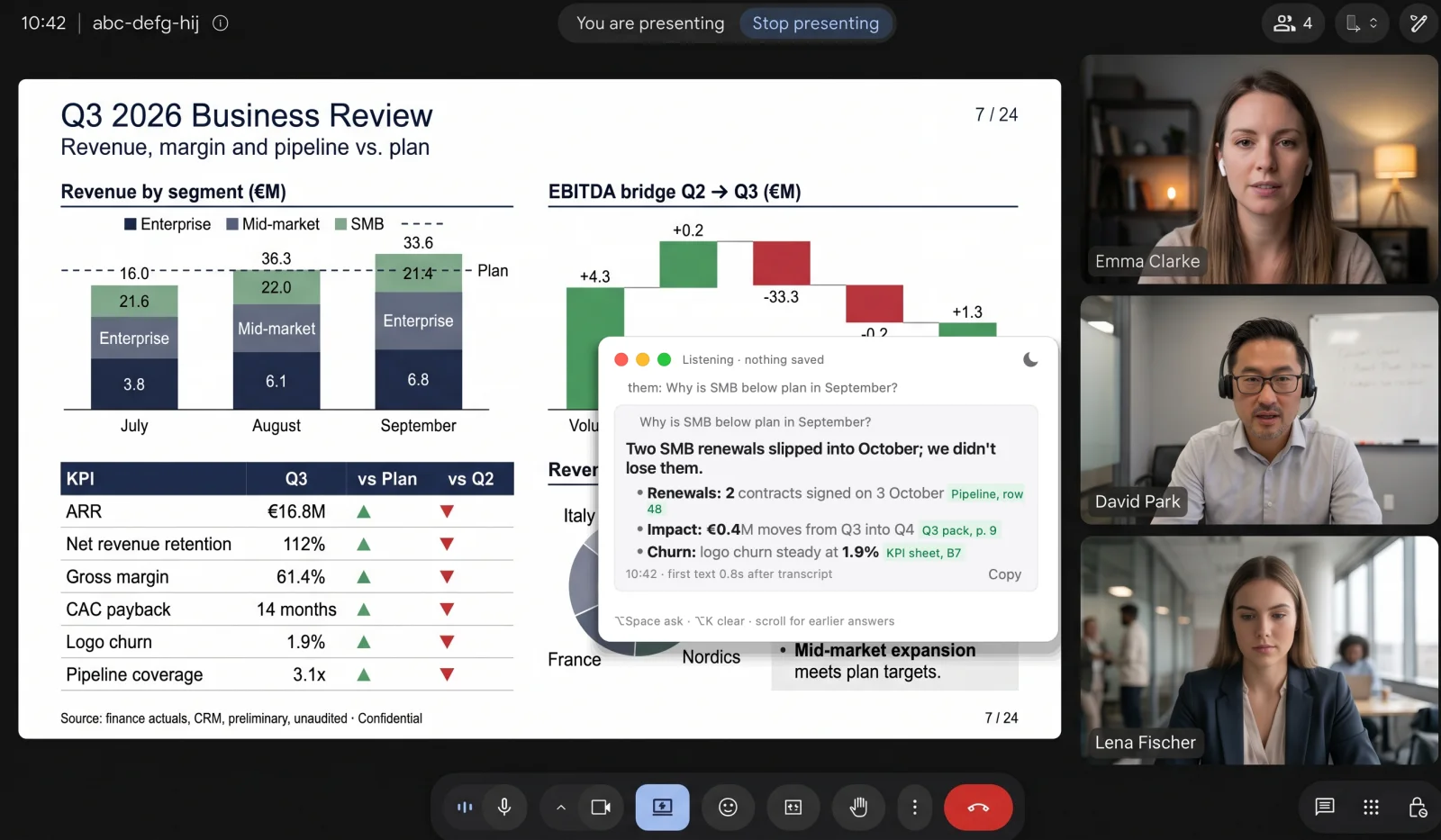
Drop in the deck, the contract, the price list. I read every page before the call starts and remember where each fact lives: the page, the table, the cell.
Murmury hears the call through your Mac's audio and turns their words into text on your Mac. Your own microphone is ignored. No bot joins the meeting.
Thanks, comments and small talk pass by. When someone actually asks you something, even without a question mark, I catch it the moment they stop talking.
A line you can say out loud, then the few numbers that matter, each with its page or table. If your documents don't cover it, I say so instead of guessing.
The window stays out of screen sharing and screenshots, through macOS itself. Tested in a real Teams share.
them: our renewals are mostly annual, and we would start with one team

PDF, Excel and text files. Every line names its source: page, table or cell.
"Not in our documents yet" beats a made-up number.Kept out of screen sharing and screenshots by macOS. Floats over full-screen apps on every desktop.
I'm small. I'm also very good at hiding.Speech is turned into text locally. Only the text of a question goes to the model, with your documents.
Nothing is saved. Quit, and it's gone.One sentence to say, then up to three facts. Choose Short, Standard or Detailed, the tone and the language.
Confident, neutral or cautious. Your call.Use the Claude Code plan you already pay for, or paste an Anthropic key. Keys stay in your Mac's Keychain.
Bring your own brain. I just do the whispering."What do you mean by 13%?" gets a plain answer, because Murmury remembers the last few questions of the call.
I also notice when one question comes in two breaths.Measured in October 2026 on a MacBook Pro with Apple Silicon and a 70-page document. Your timing depends on the model, your connection and your documents.
Download, drag to Applications, allow two permissions, connect Claude, add your documents.
Open Murmury.dmg and drag the elf into your Applications folder.
This early build isn't notarized by Apple yet. If macOS stops it, go to System Settings › Privacy & Security and click "Open Anyway". You only do this once.
Murmury needs the call's audio to hear the questions, and your microphone to tell your voice apart. macOS asks the first time you press Start Listening.
If Claude Code is installed and signed in, Murmury finds it by itself. Otherwise paste an Anthropic key; it goes into your Keychain.
Drop the files, say what the call is ("a sales call with a new client"), press Start Listening. The speech model downloads on first use.
Murmury costs nothing. Answers come from the Claude plan or API key you already have.
The per-question figure was measured with Claude Sonnet and a 70-page document cached for the call; caching the documents costs about $0.40 an hour.

Murmury is a tool. Where, when and how you use it is your decision, and so is the responsibility. We take none for how it's used.
You know your own rules better than we do. Where the law asks for the consent of the people on your call, getting it is on you too. Details in the Terms.
Murmury is a free real-time AI call assistant for Mac. During a Zoom, Google Meet or Microsoft Teams call it transcribes the other side on your Mac, notices questions, and shows a short answer from your own documents (PDF, Excel, text) in a small window that screen sharing does not capture. The answers come from your own Claude.
If you want answers from your own documents, yes. Murmury is free, runs on your Mac with your own Claude plan or Anthropic key, transcribes speech locally, joins no meeting as a bot, and saves nothing about the call.
No. It reads the call's audio on your Mac through macOS. No bot appears, nobody gets a "recording" notice, and the other side sees nothing new.
No. The window is excluded from screen sharing and screenshots through macOS. We tested it in a real Microsoft Teams share. Check once with your own setup before an important call.
Any app that plays the call through your Mac: Zoom, Google Meet, Microsoft Teams and the rest. Headphones or speakers both work.
It says so: "That is not in our documents yet", plus the closest fact it does have. It never invents a figure.
Yes. It answers in the language of the question, or a fixed language you pick. A question in Italian gets an answer in Italian.
Not yet. Murmury is built for Macs with Apple Silicon, because the transcription runs on the Mac's own chip.
With Claude Code it uses your existing plan. With an API key, about 2 cents per question plus about $0.40 an hour to keep your documents cached, measured with Claude Sonnet and a 70-page document.

Free for Mac. Five minutes to set up. One small elf on your side.